
Configure the restaurant identity details used in the customer-facing experience and choose the single operating currency used for restaurant prices, orders, dashboard totals and reports.
Open Store Settings
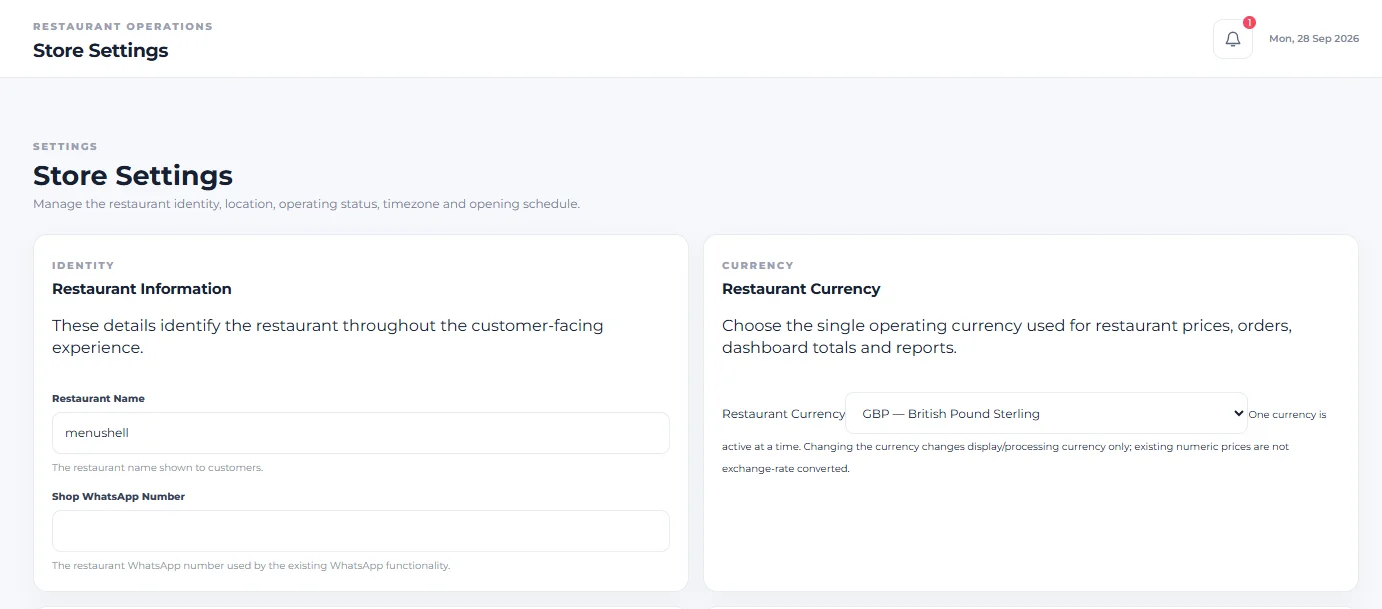
From the restaurant dashboard, open Store Settings. This guide focuses on Restaurant Information and Restaurant Currency.
Set the Restaurant Name
In Restaurant Information, use Restaurant Name to enter the restaurant name shown to customers.
Set the Shop WhatsApp Number
Use Shop WhatsApp Number for the restaurant WhatsApp number used by the existing WhatsApp functionality.
This field is identified on the Store Settings screen as the restaurant WhatsApp number used by the existing WhatsApp functionality.
Choose the Restaurant Currency
In Restaurant Currency, choose the restaurant’s operating currency. The screen states that this currency is used for restaurant prices, orders, dashboard totals and reports.
Understand the single-currency setting
Only one currency is active at a time. The captured Store Settings screen shows GBP — British Pound Sterling as the selected currency.
Changing the currency changes the display/processing currency only. Existing numeric prices are not exchange-rate converted. Review your restaurant’s prices when changing the operating currency.
Save the Store Settings
After making the required changes, use Save Store Settings to save the configuration.
Your restaurant identity and operating currency are configured. The selected currency is used for restaurant prices, orders, dashboard totals and reports.